
| devakf É |
|
Devakey 3.0
Usermanual |
Devakey 3.0 - Reference
Userdefined Mode
The „userdefined mode“ can be used in different ways, depending on your personal configuration. Please consult the settings under „Convert / Setup conversion“ before selecting the usermode.
The Usermode is needed for import and export of a text. You can select different Sanskrit-formats in the menu. Text will then be converted automatically from and to this format, when you switch to ‘Usermode’.
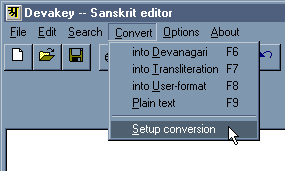
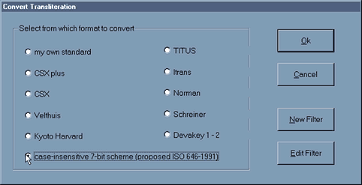
First you select „Convert / Setup conversion“. You will then get a window with the option of different Sanskrit-Formats. Select one of them, which will be activated with the ‘Usermode’.
For example, if you want to send a text via email, you may select the Sanskrit-format „case-insensitive 7-bit scheme“. This is a ‘text-only-format’ that uses no special characters, but follows an international standard that utilizes only simple ASCII-characters, so no information can be lost. To give you an idea, „â“ becomes „Aa“, „ù“ becomes „.s“, ...
 Use
the „7-Bit“-mode for email, then no information will be lost.
Use
the „7-Bit“-mode for email, then no information will be lost.
Importing Text
You have the possibility to open any file that comes in one of the supported Sanskrit-formats (please use the menu „Convert / Setup conversion“ to see, which formats are supported in your version of Devakey.
If you want to open a text, that you got from an Internetserver or a friend, than use the following steps:
1.) First
of all, you have to know, what is the Sanskrit-format of the text under
consideration. If not mentioned explicitely, you may usually find some
information at the beginning of the text. Very common are „Kyoto-Harvard“
and the CSX-format („Classical-Sanskrit-eXtended“).
You may find a note saying for example „CSX-encoded“.
2.) Select
the corresponding Sanskrit-format under „Convert / setup conversion“
in the menu.
3.) Change
to the Userdefined-mode, by clicking on the  icon (or choose „ Convert / Into User-Format
“ ).
icon (or choose „ Convert / Into User-Format
“ ).
4.) Now
you are ready to open your file with the text to import (or copy and paste
it from your wordprocessor).
5.) Some
Sanskrit-formats, like „CSX+“ need a corresponding font in order to see
the correct characters on the screen. Select the text and format it with
the applicable font. For example „Times CSX+“ or „Helvetica CSX+“.
Now you can go on and select any part or the whole text and convert
it into devnagrf. Just by clicking
on the  -Icon,
you change to the Devanàgari-Modus.
-Icon,
you change to the Devanàgari-Modus.
Exporting a Text
Devakey saves all files in the Rich-Text-Format (.RTF) that is supported by almost any wordprocessor. So you can use your favourite wordprocessor to insert Sanskrit into your documents or to extensively format a text, you typed in Devakey.
If you want to save a text in a specific Sanskrit-format, for example
„CSX+ encoding“, then first change the whole text into devnagrf
(
) or Transliteration
(  ) and
than again go to the „Convert/Setup“ - menu, select that format
and then transfer the selected text by clicking on the
- icon. Now save the text under a new name or copy and paste it into a
new document of Devakey or your wordprocessor.
) and
than again go to the „Convert/Setup“ - menu, select that format
and then transfer the selected text by clicking on the
- icon. Now save the text under a new name or copy and paste it into a
new document of Devakey or your wordprocessor.